PDFs online signieren
Unterschreibe und fordere Unterschriften für PDFs direkt in Gmail an.

Vertraut von +3M Nutzer




Genutzt von Profis bei







Wichtige Funktionen für reibungsloses Unterschreiben von Dokumenten
Das PDF-Unterschriften-Tool von Mailsuite verändert, wie du Dokumente unterschreibst. Es funktioniert direkt in deinem Posteingang, damit du Dokumente mühelos versendest, unterschreibst und trackst.
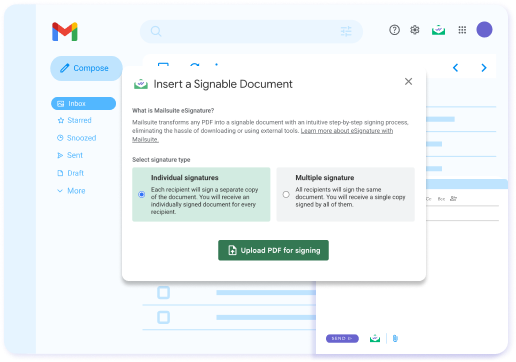
Keine externen Tools nötig – sende direkt aus Gmail
Mailsuite verwandelt jedes PDF in einen unterschreibbaren Link in deiner E-Mail. So versendest du sie wie jede andere E-Mail, ohne Anhänge oder zusätzliche Tools. Unterschriebene Kopien werden sicher gespeichert.
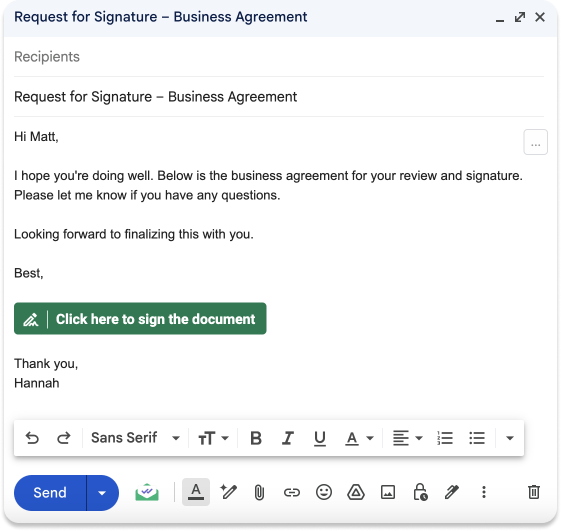
Empfänger unterschreiben das PDF über einen Link
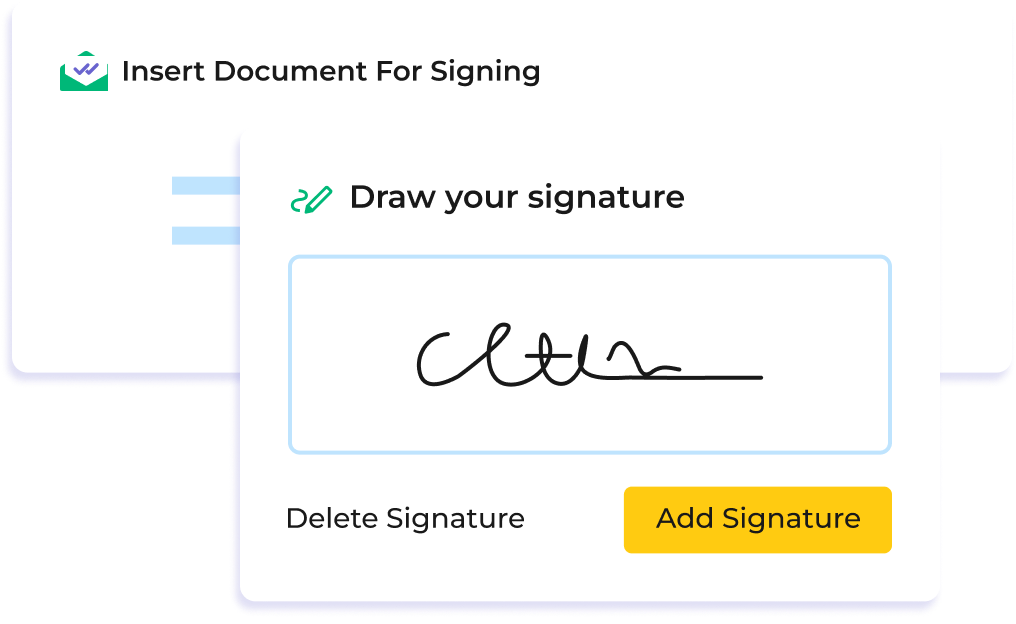
Deine Empfänger müssen keinen Anhang herunterladen, unterschreiben und zurückschicken. Stattdessen erhalten sie einen Link zu einem intuitiven, schrittweisen Unterschriftsprozess, der das unterschriebene Dokument am Ende automatisch an alle Beteiligten schickt.
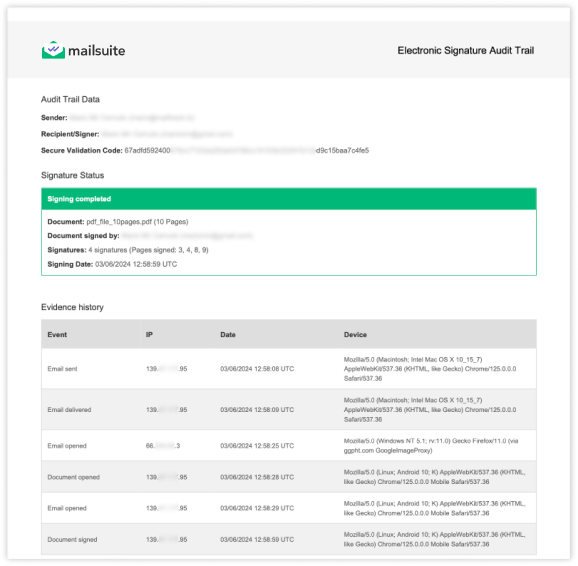
Erhalte rechtsgültige Unterschriften
Erhalte ein vollständiges Prüfprotokoll, das jede Unterschrift bestätigt. Du siehst, wer das Dokument unterschrieben hat, wann und von wo, inklusive IP-Adresse und Gerät. Das dient als Nachweis bei rechtlichen Streitigkeiten und Compliance-Prüfungen.

Fortschrittliche Verschlüsselung & sichere Cloud-Infrastruktur
Mailsuite ist offizieller Google-Cloud-Partner und besteht die von Google geforderte jährliche Sicherheitsprüfung. Zudem sind wir ISO-27001-zertifiziert. Unser Service läuft auf einer hochsicheren Infrastruktur: Alle Daten werden mit dem 256-Bit-Verschlüsselungsstandard AES-256 in einer virtuellen privaten Cloud (VPC) von Amazon Web Services (AWS) in Irland verschlüsselt.
Der Einstieg ist ganz einfach
-
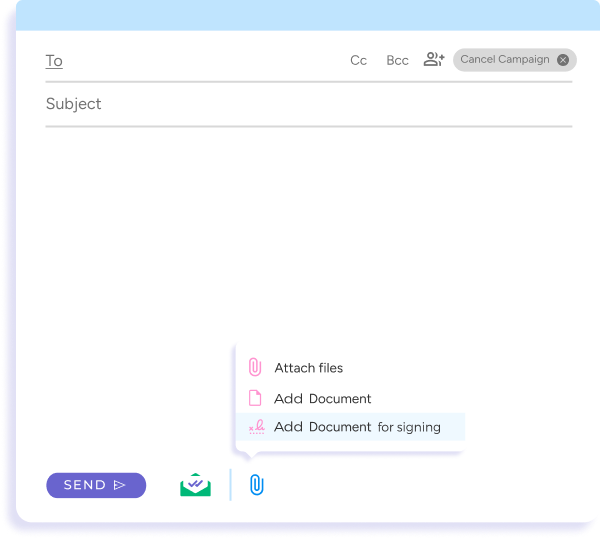
Schritt 1
Hänge ein Dokument zum Unterschreiben an
Hänge das PDF wie gewohnt an deine E-Mail an.
-
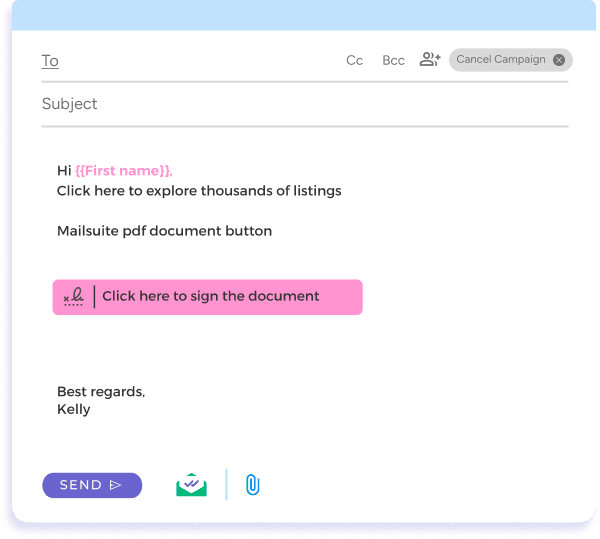
Schritt 2
Versende dein Dokument zur Unterschrift
Wenn du deine E-Mail fertig geschrieben hast, klick einfach auf Senden.
-
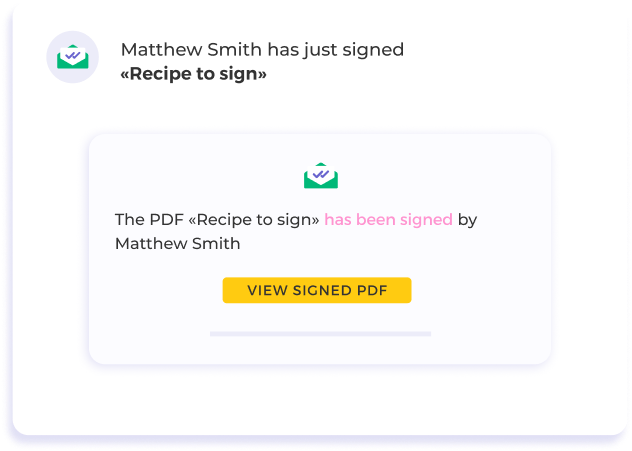
Schritt 3
Verfolge den Unterschriftsprozess
Erhalte Benachrichtigungen, sobald dein Dokument unterschrieben ist, und sieh es dir direkt in deinem Posteingang an.
Und viele weitere Funktionen
Hol dir Unterschriften aus deinem Postfach
Sende und empfange Dokumente zum Unterschreiben, ohne dein Postfach zu verlassen. Mit Mailsuite verwandelst du jedes PDF im Handumdrehen in ein unterschreibbares Dokument.
Echtzeit-Benachrichtigungen für PDF-Signaturen
Bleib informiert mit sofortigen Benachrichtigungen, wenn dein Dokument angesehen oder unterschrieben wird. So kannst du direkt nachfassen und deine Projekte voranbringen.
Detaillierte Dokumenteinblicke
Verstehe das Verhalten deiner Empfänger mit erweiterten Statistiken. Von Dokumentaufrufen bis zu Abschlussraten – unsere detaillierten Einblicke helfen dir, deine Signaturstrategie zu optimieren.
Anpassbare Kontrollen für PDF-Signaturen
Lege Zugriffsparameter für Dokumente fest, einschließlich Ablaufdaten, um die Kontrolle über sensible Informationen zu behalten.
Greif jederzeit und überall auf deine unterschriebenen Dokumente zu
Mit dem bereitgestellten Link kannst du das unterschriebene Dokument jederzeit ansehen und für deine Unterlagen herunterladen. Egal ob unterwegs oder am Schreibtisch – deine wichtigen Dokumente sind nur einen Klick entfernt.
FAQ
Deine Fragen zur Dokumentsignatur, beantwortet
-
Wie sende ich ein PDF direkt aus meiner E-Mail zur Unterschrift?
Mit unserer PDF-Signatur-Lösung sendest du PDFs ganz einfach zur Unterschrift (PDF eSignieren) direkt aus deiner E-Mail. Der Prozess ist bewusst einfach gehalten, sodass du Dokumente zur elektronischen Signatur senden kannst, ohne dein Postfach zu verlassen -
Was passiert, nachdem ich ein PDF elektronisch unterschrieben habe oder jemand ein Dokument online unterschreibt?
Sobald ein Dokument digital unterschrieben wurde, erhältst du sofort eine E-Mail-Benachrichtigung zur Bestätigung. Diese enthält einen Link, um das unterschriebene PDF online anzusehen und für deine Unterlagen herunterzuladen. Zusätzlich informiert dich unsere Plattform in Echtzeit über jeden Aufruf des Dokuments -
Ist es sicher, PDFs digital zu unterschreiben und die PDF-Signatur für rechtliche Dokumente zu nutzen?
Auf jeden Fall. Unsere PDF-Signatur legt großen Wert auf Sicherheit, besonders bei sensiblen und rechtlichen Dokumenten. Mit Funktionen wie Zugriffskontrolle und Ablaufdaten kannst du PDFs sicher elektronisch unterschreiben und zur Signatur versenden -
Kann ich die Interaktion mit meinen elektronisch unterschriebenen Dokumenten nachverfolgen?
Ja, unsere PDF-Signatur bietet umfassende Statistiken, inklusive seitenweiser Einblicke, wie Empfänger mit deinen Dokumenten interagieren. Das ist besonders nützlich, um das Interesse zu verstehen und künftige Dokumente zu optimieren -
Wie fange ich an, Dokumente für die PDF-Signatur zu versenden?
Der Einstieg ist ganz einfach. Klicke einfach auf „Kostenlos installieren“, um die PDF-Signatur in deinen Workflow zu integrieren. So hast du sofort Zugriff und kannst direkt Dokumente zur digitalen Unterschrift versenden – für ein effizienteres Dokumentenmanagement -
Wie groß darf ein PDF maximal sein, um es zu signieren?
PDFs dürfen maximal 10 MB groß sein
Datenschutz- und Sicherheitszentrum
Die Dienste von Mailsuite und Mailtrack werden von mehr als 116.000 zahlenden Abonnenten und Unternehmen weltweit genutzt.
Mehr lesen